

Introduction
As I became more familiar with building APIs and connecting applications to external services, I started wondering how digital payments actually work behind the scenes. Features like wallet top-ups look simple from the user’s perspective: choose an amount, make a payment, and the balance increases automatically. But from the backend side, I was curious about how the system knows when a payment is completed and when it is safe to update the user’s balance.
In this article, I will share a simple implementation of a wallet top-up flow using Xendit as the payment gateway, NestJS as the backend framework, and ngrok for local webhook testing without deploying the backend to a public server
Prerequisites
Before we start, there are a few things you should prepare. This article does not require a fully deployed backend server because we will use ngrok to expose our local NestJS application for webhook testing.
You should have a basic understanding of:
You will also need:
1. Project Setup
If you already have an existing NestJS project, you can continue using it. But if you haven’t created one, you can use the Nest CLI to generate a new project.
nest new nestjs-payment-api1.1 Install Dependencies
Next, install the required dependencies for this project.
npm install @prisma/client @nestjs/jwt @nestjs/config class-validator class-transformer bcrypt @prisma/adapter-pgnpm install -D prisma @types/bcryptHere is a short explanation of what these packages are used for:
@prisma/clientis used to communicate with the database through Prisma.prismais used for database schema management and migrations.@nestjs/configis used to load environment variables from the.envfile.@nestjs/jwtis used to handle JWT-based authentication.
In this tutorial, JWT authentication is used to protect the wallet top-up endpoint, so only authenticated users can create a payment invoice.
1.2 Environment Variables
Create a .env file in the root of your project:
# Database
DATABASE_URL=postgresql://user:password@localhost:5432/dbname

# JWT
JWT_ACCESS_SECRET=your-secret-key

# Xendit
XENDIT_SECRET_KEY=xnd_development_...
XENDIT_WEBHOOK_TOKEN=your-webhook-token
Then add the environment variables based on your own project configuration.
The DATABASE_URL will be used by Prisma to connect to PostgreSQL. Make sure to adjust the username, password, host, port, and database name according to your local or production database setup.
The JWT_ACCESS_SECRET will be used to sign and verify access tokens. In a real project, you should use a strong and secure secret value.
The XENDIT_SECRET_KEY is used by the backend to create invoices through the Xendit API. You can get this key from your Xendit dashboard.
The XENDIT_WEBHOOK_TOKEN is used to validate incoming webhook requests from Xendit. This is important because the webhook endpoint will be publicly accessible, especially when we expose our local server using ngrok.
1.3 Prisma Setup
After configuring the environment variables, initialize Prisma:
npx prisma initThis command will create a prisma folder and a schema.prisma file. The schema.prisma file is where we will define our database models, such as users, wallets, wallet top-ups, and wallet transactions.
After the schema is created, run the migration:
npx prisma migrate dev --name initThen generate the Prisma Client:
npx prisma generateThe migration command will apply our database schema to PostgreSQL, while the generate command will create the Prisma Client that we can use inside our NestJS services.
We will define the actual Prisma schema in the next section.
1.4 Module Registration
Before diving into the implementation, let's set up the required modules. We will create four modules: PrismaModule, AuthModule, WalletsModule, and PaymentsModule.
Prisma Module
The PrismaModule is responsible for providing the database client across the application. Create the files manually:
Create src/prisma.module.ts:
import { Global, Module } from '@nestjs/common';
import { PrismaService } from './prisma.service';

@Global()
@Module({
  providers: [PrismaService],
  exports: [PrismaService],
})
export class PrismaModule {}
Create src/prisma.service.ts:
import { Injectable } from '@nestjs/common';
import { PrismaClient } from './generated/prisma/client';
import { PrismaPg } from '@prisma/adapter-pg';

@Injectable()
export class PrismaService extends PrismaClient {
  constructor() {
    const connectionString = process.env.DATABASE_URL;
    if (!connectionString) {
      throw new Error('DATABASE_URL environment variable is not set');
    }
    const adapter = new PrismaPg(connectionString);
    super({ adapter });
  }
}
A few things worth noting:
By marking
PrismaModulewith@Global(),PrismaServiceis available in every module without needing to importPrismaModulerepeatedly.This project uses Prisma 7 with
@prisma/adapter-pgas the database adapter. In Prisma 7,PrismaClientis no longer imported from@prisma/client— instead it comes from the generated client at./generated/prisma/client. Connection handling is done through the adapter, so$connect()is no longer needed.
Auth Module
The AuthModule handles JWT validation. Generate the module, service, and controller:
nest g module auth
nest g service auth
nest g controller auth
Then create the JWT guard at src/auth/guards/jwt-access.guard.ts:
import {
  CanActivate,
  ExecutionContext,
  Injectable,
  InternalServerErrorException,
  UnauthorizedException,
} from '@nestjs/common';
import { JwtService } from '@nestjs/jwt';
import { Request } from 'express';

type AccessTokenPayload = {
  sub: string;
  username: string;
  role: string;
  iat: number;
  exp: number;
};

@Injectable()
export class JwtAccessGuard implements CanActivate {
  constructor(private readonly jwtService: JwtService) {}

  async canActivate(context: ExecutionContext): Promise<boolean> {
    const request = context
      .switchToHttp()
      .getRequest<Request & { user?: AccessTokenPayload }>();

    const token = this.extractBearerToken(request);

    if (!token) {
      throw new UnauthorizedException('Missing or invalid authorization header');
    }

    const secret = process.env.JWT_ACCESS_SECRET?.trim();
    if (!secret) {
      throw new InternalServerErrorException('JWT_ACCESS_SECRET is not configured');
    }

    try {
      const payload = await this.jwtService.verifyAsync<AccessTokenPayload>(
        token,
        { secret },
      );
      request.user = payload;
      return true;
    } catch {
      throw new UnauthorizedException('Invalid access token');
    }
  }

  private extractBearerToken(request: Request): string | null {
    const auth = request.get('authorization');
    if (!auth) return null;
    const [type, token] = auth.split(' ');
    if (type !== 'Bearer' || !token) return null;
    return token;
  }
}
Update src/auth/auth.module.ts:
import { Module } from '@nestjs/common';
import { AuthController } from './auth.controller';
import { AuthService } from './auth.service';
import { JwtModule } from '@nestjs/jwt';
import { JwtAccessGuard } from './guards/jwt-access.guard';

@Module({
  imports: [JwtModule.register({})],
  controllers: [AuthController],
  providers: [AuthService, JwtAccessGuard],
})
export class AuthModule {}
JwtModule.register({})is registered with an empty config because the JWT secret is read directly fromprocess.envat runtime inside the guard, not at module initialization time.
Wallets Module
The WalletsModule manages wallet balance and transaction history. We will use it in the testing section to verify that the wallet balance was credited after a successful payment. Generate the module, service, and controller:
nest g module wallets
nest g service wallets
nest g controller wallets
Update src/wallets/wallets.module.ts:
import { Module } from '@nestjs/common';
import { WalletsService } from './wallets.service';
import { WalletsController } from './wallets.controller';
import { JwtModule } from '@nestjs/jwt';

@Module({
  imports: [JwtModule.register({})],
  providers: [WalletsService],
  controllers: [WalletsController],
})
export class WalletsModule {}
We will implement the service and controller for this module in the testing section.
Payments Module
The PaymentsModule handles wallet top-up creation and Xendit webhook processing. Generate the module, service, and controller:
nest g module payments
nest g service payments
nest g controller payments
Update src/payments/payments.module.ts:
import { Module } from '@nestjs/common';
import { PaymentsService } from './payments.service';
import { PaymentsController } from './payments.controller';
import { XenditService } from './xendit/xendit.service';
import { JwtModule } from '@nestjs/jwt';

@Module({
  imports: [JwtModule.register({})],
  providers: [PaymentsService, XenditService],
  controllers: [PaymentsController],
})
export class PaymentsModule {}
Wiring Everything in AppModule
Finally, register all modules in src/app.module.ts:
import { Module } from '@nestjs/common';
import { ConfigModule } from '@nestjs/config';
import { PrismaModule } from './prisma.module';
import { AuthModule } from './auth/auth.module';
import { WalletsModule } from './wallets/wallets.module';
import { PaymentsModule } from './payments/payments.module';

@Module({
  imports: [
    ConfigModule.forRoot({ isGlobal: true }),
    PrismaModule,
    AuthModule,
    WalletsModule,
    PaymentsModule,
  ],
})
export class AppModule {}
1.5 Application Setup
Before running the application, we need to configure the global prefix and validation pipe. Open src/main.ts and update it:
import { NestFactory } from '@nestjs/core';
import { ValidationPipe } from '@nestjs/common';
import { AppModule } from './app.module';

async function bootstrap() {
  const app = await NestFactory.create(AppModule);

  app.setGlobalPrefix('api/v1');

  app.useGlobalPipes(
    new ValidationPipe({
      whitelist: true,
      forbidNonWhitelisted: true,
      transform: true,
    }),
  );

  await app.listen(process.env.PORT ?? 3000);
}
bootstrap();
A few things worth noting:
setGlobalPrefix('api/v1')adds/api/v1prefix to all endpoints, so for examplePOST /auth/registerbecomesPOST /api/v1/auth/registerValidationPipewithwhitelist: truestrips any properties that are not in the DTO,forbidNonWhitelisted: truethrows an error if unknown properties are sent, andtransform: trueautomatically transforms incoming request data into the correct DTO class instances — this is required forclass-validatordecorators to workPORTenv variable can be used to change the port, with3000as the fallback
2. Database Schema
In this section, we will define the database models needed for the payment flow. Open prisma/schema.prisma and define the following models.
2.1 Generator & Datasource
This project uses Prisma 7, which introduces a change in how database connections are configured. Starting from Prisma 7, the url property is no longer supported inside schema.prisma. Instead, the connection URL is moved to a separate prisma.config.ts file.
First, install the dotenv package so prisma.config.ts can load environment variables:
npm install dotenvCreate prisma.config.ts in the root of your project:
import 'dotenv/config';
import { defineConfig } from 'prisma/config';

export default defineConfig({
  schema: 'prisma/schema.prisma',
  migrations: {
    path: 'prisma/migrations',
  },
  datasource: {
    url: process.env['DATABASE_URL'],
  },
});
Then open prisma/schema.prisma and define the generator and datasource like this:
generator client {
  provider = "prisma-client"
  output   = "../src/generated/prisma"
}

datasource db {
  provider = "postgresql"
}
A few things worth noting:
provider = "prisma-client"is the new provider name in Prisma 7, replacing the oldprisma-client-jsoutput = "../src/generated/prisma"tells Prisma to generate the client intosrc/generated/prismainstead ofnode_modules, so the generated types are part of your source code and easier to inspectThe
datasourceblock no longer containsurl— that's now handled byprisma.config.ts
2.2 User
The User model stores the basic user data. Each user will have one wallet.
model User {
  id       String @id @default(cuid())
  email    String @unique
  password String
  username String @unique
  name     String?
  role     String   @default("USER")
  isActive Boolean  @default(true)

  wallet       Wallet?
  walletTopUps WalletTopUp[]

  createdAt DateTime @default(now())
  updatedAt DateTime @updatedAt

  @@map("users")
}
2.3 Wallet
Each user has one wallet. The balance field uses Decimal(18, 2) to avoid floating point precision issues when dealing with monetary values.
model Wallet {
  id       String  @id @default(cuid())
  userId   String  @unique
  balance  Decimal @db.Decimal(18, 2)
  currency String  @default("IDR")

  user               User                @relation(fields: [userId], references: [id], onDelete: Cascade)
  walletTransactions WalletTransaction[]

  createdAt DateTime @default(now())
  updatedAt DateTime @updatedAt

  @@map("wallets")
}
2.4 WalletTransaction
Every balance change is recorded as a transaction. This gives us a full audit trail of what happened to the wallet balance.
enum WalletTransactionType {
  TOP_UP
  TRANSFER_IN
  TRANSFER_OUT
  ADJUSTMENT
}

model WalletTransaction {
  id           String                @id @default(cuid())
  walletId     String
  type         WalletTransactionType
  amount       Decimal               @db.Decimal(18, 2)
  balanceAfter Decimal               @db.Decimal(18, 2)
  description  String?
  reference    String?

  wallet Wallet @relation(fields: [walletId], references: [id], onDelete: Cascade)

  createdAt DateTime @default(now())

  @@index([walletId, createdAt])
  @@map("wallet_transactions")
}
2.5 WalletTopUp
This is the core model for the payment flow. It tracks each top-up request from creation through to payment confirmation from Xendit.
enum PaymentStatus {
  PENDING
  PAID
  EXPIRED
  FAILED
}

model WalletTopUp {
  id       String        @id @default(cuid())
  userId   String
  amount   Decimal       @db.Decimal(18, 2)
  currency String        @default("IDR")
  status   PaymentStatus @default(PENDING)

  reference        String  @unique
  idempotencyKey   String?
  xenditInvoiceId  String? @unique
  xenditInvoiceUrl String?

  paidAt    DateTime?
  expiredAt DateTime?

  user User @relation(fields: [userId], references: [id], onDelete: Cascade)

  createdAt DateTime @default(now())
  updatedAt DateTime @updatedAt

  @@unique([userId, idempotencyKey])
  @@index([userId, status])
  @@map("wallet_top_ups")
}
A few things worth noting:
referenceis a unique identifier we generate internally and pass to Xendit asexternal_id. This is how we match incoming webhooks back to the correct top-up record.idempotencyKeywith@@unique([userId, idempotencyKey])prevents duplicate top-up requests from the same user.xenditInvoiceIdandxenditInvoiceUrlare populated after the Xendit invoice is successfully created.
Once all models are defined, run the migration to apply the schema to your database:
npx prisma migrate dev --name add-wallet-payment-models
npx prisma generate
3. Authentication
We will keep the authentication part simple and only cover what is essential for the payment flow: user registration, login to generate an access token, and a JWT guard to protect the top-up endpoint.
3.1 DTOs
Create src/auth/dto/register.dto.ts:
import { IsEmail, IsOptional, IsString, MinLength } from 'class-validator';

export class RegisterDto {
  @IsEmail()
  email!: string;

  @IsString()
  @MinLength(8)
  password!: string;

  @IsOptional()
  @IsString()
  name?: string;

  @IsString()
  @MinLength(5)
  username!: string;
}
Create src/auth/dto/login.dto.ts:
import { IsString, MinLength } from 'class-validator';

export class LoginDto {
  @IsString()
  username!: string;

  @IsString()
  @MinLength(8)
  password!: string;
}

export class LoginResponseDto {
  accessToken!: string;
  refreshToken!: string;
  tokenType!: 'Bearer';
  expiresIn!: number;
  user!: {
    id: string;
    email: string;
    name: string | null;
    username: string;
    role: string;
  };
}
3.2 Auth Service
The AuthService handles user registration and login. On register, a wallet is automatically created inside the same database transaction. On login, it signs a JWT access token with the user's id, username, and role as the payload.
Create src/auth/auth.service.ts:
import {
  ConflictException,
  Injectable,
  InternalServerErrorException,
  UnauthorizedException,
} from '@nestjs/common';
import { JwtService } from '@nestjs/jwt';
import * as bcrypt from 'bcrypt';
import { Prisma } from 'src/generated/prisma/client';
import { PrismaService } from 'src/prisma.service';
import { LoginDto, LoginResponseDto } from './dto/login.dto';
import { RegisterDto } from './dto/register.dto';

@Injectable()
export class AuthService {
  private readonly accessSecret: string;
  private readonly accessExpiresIn: number;

  constructor(
    private readonly prisma: PrismaService,
    private readonly jwtService: JwtService,
  ) {
    const secret = process.env.JWT_ACCESS_SECRET?.trim();
    if (!secret) {
      throw new InternalServerErrorException('JWT_ACCESS_SECRET is not configured');
    }
    this.accessSecret = secret;
    this.accessExpiresIn = 900;
  }

  async register(dto: RegisterDto) {
    const email = dto.email.trim().toLowerCase();
    const username = dto.username.trim().toLowerCase();

    const existing = await this.prisma.user.findFirst({
      where: { OR: [{ email }, { username }] },
    });

    if (existing) {
      throw new ConflictException('Email or username already registered');
    }

    const hashedPassword = await bcrypt.hash(dto.password, 10);

    return this.prisma.$transaction(async (tx) => {
      const user = await tx.user.create({
        data: {
          email,
          password: hashedPassword,
          name: dto.name?.trim() || null,
          username,
          isActive: true,
        },
        select: { id: true, email: true, username: true, name: true, role: true, createdAt: true },
      });

      await tx.wallet.create({
        data: {
          userId: user.id,
          balance: new Prisma.Decimal(0),
          currency: 'IDR',
        },
      });

      return user;
    });
  }

  async login(dto: LoginDto): Promise<LoginResponseDto> {
    const username = dto.username.trim().toLowerCase();

    const user = await this.prisma.user.findUnique({ where: { username } });

    if (!user) {
      throw new UnauthorizedException('Invalid credentials');
    }

    const valid = await bcrypt.compare(dto.password, user.password);
    if (!valid) {
      throw new UnauthorizedException('Invalid credentials');
    }

    const accessToken = await this.jwtService.signAsync(
      { sub: user.id, username: user.username, role: user.role },
      { secret: this.accessSecret, expiresIn: this.accessExpiresIn },
    );

    return {
      accessToken,
      refreshToken: '',
      tokenType: 'Bearer',
      expiresIn: this.accessExpiresIn,
      user: {
        id: user.id,
        email: user.email,
        username: user.username,
        name: user.name,
        role: user.role,
      },
    };
  }
}
Notice that on register, we create the user and wallet inside a single
$transaction. This guarantees that if wallet creation fails, the user is also rolled back — no orphaned users without a wallet.
3.3 Auth Controller
Create src/auth/auth.controller.ts with only the two endpoints we need:
import { Body, Controller, Post } from '@nestjs/common';
import { AuthService } from './auth.service';
import { RegisterDto } from './dto/register.dto';
import { LoginDto, LoginResponseDto } from './dto/login.dto';

@Controller('auth')
export class AuthController {
  constructor(private readonly authService: AuthService) {}

  @Post('register')
  async register(@Body() dto: RegisterDto) {
    return this.authService.register(dto);
  }

  @Post('login')
  async login(@Body() dto: LoginDto): Promise<LoginResponseDto> {
    return this.authService.login(dto);
  }
}
3.4 JWT Guard
The JwtAccessGuard was already created in section 1.4 when we set up the AuthModule. It reads the Authorization: Bearer <token> header, verifies the JWT using JWT_ACCESS_SECRET, and attaches the decoded payload to req.user.
To protect any endpoint with this guard, simply add @UseGuards(JwtAccessGuard) to the controller method:
@Post('wallet-top-ups')
@UseGuards(JwtAccessGuard)
async createWalletTopUp(
  @Req() req: Request & { user?: { sub: string } },
  ...
) {
  const userId = req.user.sub;
  ...
}
We will use this guard in the next section when building the top-up endpoint.
4. Xendit Service
The XenditService is a thin wrapper around the Xendit REST API. It has two responsibilities: creating an invoice and verifying the webhook callback token.
Create src/payments/xendit/xendit.types.ts:
export type CreateXenditInvoiceInput = {
  externalId: string;
  amount: number;
  payerEmail: string;
  description: string;
  currency?: 'IDR';
  successRedirectUrl?: string;
  failureRedirectUrl?: string;
};

export type CreateXenditInvoiceResult = {
  id: string;
  externalId: string;
  status: string;
  invoiceUrl: string;
  amount: number;
  currency: string;
  expiryDate?: string;
};

export type XenditInvoiceResponse = {
  id: string;
  external_id: string;
  status: string;
  invoice_url: string;
  amount: number;
  currency: string;
  expiry_date?: string;
};
Create src/payments/xendit/xendit.service.ts:
import {
  Injectable,
  InternalServerErrorException,
  UnauthorizedException,
} from '@nestjs/common';
import {
  CreateXenditInvoiceInput,
  CreateXenditInvoiceResult,
  XenditInvoiceResponse,
} from './xendit.types';

@Injectable()
export class XenditService {
  private readonly baseUrl = 'https://api.xendit.co';

  private get secretKey(): string {
    const secretKey = process.env.XENDIT_SECRET_KEY;
    if (!secretKey) {
      throw new InternalServerErrorException('XENDIT_SECRET_KEY is not set');
    }
    return secretKey;
  }

  async createInvoice(
    input: CreateXenditInvoiceInput,
  ): Promise<CreateXenditInvoiceResult> {
    const response = await fetch(`${this.baseUrl}/v2/invoices`, {
      method: 'POST',
      headers: {
        Authorization: this.createAuthorizationHeader(),
        'Content-Type': 'application/json',
      },
      body: JSON.stringify({
        external_id: input.externalId,
        amount: input.amount,
        payer_email: input.payerEmail,
        description: input.description,
        currency: input.currency ?? 'IDR',
        success_redirect_url: input.successRedirectUrl,
        failure_redirect_url: input.failureRedirectUrl,
      }),
    });

    const data = (await response.json()) as XenditInvoiceResponse;

    if (!response.ok) {
      throw new InternalServerErrorException({
        message: 'Failed to create Xendit invoice',
        statusCode: response.status,
        xenditResponse: data,
      });
    }

    return {
      id: data.id,
      externalId: data.external_id,
      status: data.status,
      invoiceUrl: data.invoice_url,
      amount: data.amount,
      currency: data.currency,
      expiryDate: data.expiry_date,
    };
  }

  verifyCallbackToken(callbackToken: string | undefined): void {
    const expectedToken = process.env.XENDIT_WEBHOOK_TOKEN;

    if (!expectedToken) {
      throw new InternalServerErrorException('XENDIT_WEBHOOK_TOKEN is not set');
    }

    if (!callbackToken || callbackToken !== expectedToken) {
      throw new UnauthorizedException('Invalid Xendit callback token');
    }
  }

  private createAuthorizationHeader(): string {
    const token = Buffer.from(`${this.secretKey}:`).toString('base64');
    return `Basic ${token}`;
  }
}
A few things worth noting:
Xendit uses HTTP Basic Auth where the
secret keyis the username and the password is left empty. That's why we append:before encoding to base64.verifyCallbackTokencompares thex-callback-tokenheader from incoming webhooks againstXENDIT_WEBHOOK_TOKENin our env. This prevents anyone from spoofing webhook calls to our endpoint.The
secretKeygetter throws at call time rather than at startup, so ifXENDIT_SECRET_KEYis missing it will surface immediately when the first invoice is created — not silently ignored.
5. Create Wallet Top-Up
This is the core of the payment flow. When a user wants to top up their wallet, they call this endpoint. The backend will create a WalletTopUp record in the database, then call the Xendit API to create an invoice. The response includes an invoiceUrl that the user visits to complete the payment.
5.1 Reference Utility
We generate a unique internal reference for each top-up. This reference is passed to Xendit as external_id, and later used to match incoming webhooks back to the correct top-up record.
Create src/common/utils/reference.util.ts:
import { randomBytes } from 'crypto';

export function generateReference(prefix: string): string {
  const random = randomBytes(8).toString('hex').toUpperCase();
  const date = new Date().toISOString().slice(0, 10).replaceAll('-', '');

  return `${prefix}-${date}-${random}`;
}
For example, calling generateReference('WTU') produces something like WTU-20260612-A3F9C2B1D4E7F8A2.
5.2 DTO
Create src/payments/dto/create-wallet-top-up.dto.ts:
import { Type } from 'class-transformer';
import { IsNumber, Min } from 'class-validator';

export class CreateWalletTopUpDto {
  @Type(() => Number)
  @IsNumber({ maxDecimalPlaces: 2 })
  @Min(1000)
  amount!: number;
}

export class CreateWalletTopUpResponseDto {
  id!: string;
  reference!: string;
  status!: string;
  amount!: string;
  currency!: string;
  invoiceUrl!: string | null;
}
The amount has a minimum of 1000 (IDR 1.000) and allows up to 2 decimal places. Notice that amount in the response DTO is a string — this is intentional because we store monetary values as Prisma.Decimal and serialize them as strings to avoid floating point precision issues.
5.3 Payments Service
Create src/payments/payments.service.ts:
import {
  BadRequestException,
  Injectable,
  NotFoundException,
} from '@nestjs/common';
import { Prisma } from 'src/generated/prisma/client';
import { generateReference } from 'src/common/utils/reference.util';
import { PrismaService } from 'src/prisma.service';
import { XenditService } from './xendit/xendit.service';
import {
  CreateWalletTopUpDto,
  CreateWalletTopUpResponseDto,
} from './dto/create-wallet-top-up.dto';

@Injectable()
export class PaymentsService {
  constructor(
    private readonly prisma: PrismaService,
    private readonly xenditService: XenditService,
  ) {}

  async createWalletTopUp(
    userId: string,
    dto: CreateWalletTopUpDto,
    idempotencyKey?: string,
  ): Promise<CreateWalletTopUpResponseDto> {
    const normalizedIdempotencyKey = idempotencyKey?.trim() || null;
    const amount = new Prisma.Decimal(dto.amount);

    if (normalizedIdempotencyKey) {
      const existing = await this.findWalletTopUpByIdempotencyKey(
        userId,
        normalizedIdempotencyKey,
      );
      if (existing) return this.mapCreateWalletTopUpResponse(existing);
    }

    const user = await this.prisma.user.findUnique({
      where: { id: userId },
      select: { email: true },
    });

    if (!user) throw new NotFoundException('User not found');

    const reference = generateReference('WTU');

    let topUp: {
      id: string;
      reference: string;
      amount: Prisma.Decimal;
      currency: string;
      status: string;
    };

    try {
      topUp = await this.prisma.walletTopUp.create({
        data: {
          userId,
          amount,
          currency: 'IDR',
          reference,
          status: 'PENDING',
          idempotencyKey: normalizedIdempotencyKey,
        },
        select: {
          id: true,
          reference: true,
          amount: true,
          currency: true,
          status: true,
        },
      });
    } catch (error) {
      const isIdempotencyConflict =
        normalizedIdempotencyKey &&
        error instanceof Prisma.PrismaClientKnownRequestError &&
        error.code === 'P2002';

      if (!isIdempotencyConflict) throw error;

      const existing = await this.findWalletTopUpByIdempotencyKey(
        userId,
        normalizedIdempotencyKey,
      );

      if (!existing) throw error;
      return this.mapCreateWalletTopUpResponse(existing);
    }

    try {
      const invoice = await this.xenditService.createInvoice({
        externalId: topUp.reference,
        amount: dto.amount,
        payerEmail: user.email,
        description: `Wallet top up ${topUp.reference}`,
        currency: 'IDR',
      });

      const updatedTopUp = await this.prisma.walletTopUp.update({
        where: { id: topUp.id },
        data: {
          xenditInvoiceId: invoice.id,
          xenditInvoiceUrl: invoice.invoiceUrl,
          expiredAt: invoice.expiryDate ? new Date(invoice.expiryDate) : null,
        },
        select: {
          id: true,
          reference: true,
          amount: true,
          currency: true,
          status: true,
          xenditInvoiceUrl: true,
        },
      });

      return this.mapCreateWalletTopUpResponse(updatedTopUp);
    } catch (error) {
      await this.prisma.walletTopUp.update({
        where: { id: topUp.id },
        data: { status: 'FAILED' },
      });
      throw error;
    }
  }

  private async findWalletTopUpByIdempotencyKey(
    userId: string,
    idempotencyKey: string,
  ) {
    return this.prisma.walletTopUp.findUnique({
      where: {
        userId_idempotencyKey: { userId, idempotencyKey },
      },
      select: {
        id: true,
        reference: true,
        amount: true,
        currency: true,
        status: true,
        xenditInvoiceUrl: true,
      },
    });
  }

  private mapCreateWalletTopUpResponse(topUp: {
    id: string;
    reference: string;
    amount: Prisma.Decimal;
    currency: string;
    status: string;
    xenditInvoiceUrl: string | null;
  }): CreateWalletTopUpResponseDto {
    return {
      id: topUp.id,
      reference: topUp.reference,
      status: topUp.status,
      amount: topUp.amount.toString(),
      currency: topUp.currency,
      invoiceUrl: topUp.xenditInvoiceUrl,
    };
  }
}
5.4 Payments Controller
Create src/payments/payments.controller.ts:
import {
  Body,
  Controller,
  Headers,
  Post,
  Req,
  UnauthorizedException,
  UseGuards,
} from '@nestjs/common';
import { Request } from 'express';
import { JwtAccessGuard } from 'src/auth/guards/jwt-access.guard';
import { PaymentsService } from './payments.service';
import {
  CreateWalletTopUpDto,
  CreateWalletTopUpResponseDto,
} from './dto/create-wallet-top-up.dto';

@Controller('payments')
export class PaymentsController {
  constructor(private readonly paymentsService: PaymentsService) {}

  @Post('wallet-top-ups')
  @UseGuards(JwtAccessGuard)
  async createWalletTopUp(
    @Req() req: Request & { user?: { sub: string } },
    @Headers('idempotency-key') idempotencyKey: string | undefined,
    @Body() dto: CreateWalletTopUpDto,
  ): Promise<CreateWalletTopUpResponseDto> {
    if (!req.user?.sub) {
      throw new UnauthorizedException('Invalid access token payload');
    }

    return this.paymentsService.createWalletTopUp(
      req.user.sub,
      dto,
      idempotencyKey,
    );
  }
}
Here's the full flow when this endpoint is called:
JwtAccessGuardvalidates the Bearer token and attachesreq.userWe check for an existing top-up by
idempotencyKey— if found, return it immediatelyWe create a
WalletTopUprecord in DB with statusPENDINGWe call Xendit to create an invoice using the
referenceasexternal_idWe update the record with
xenditInvoiceId,xenditInvoiceUrl, andexpiredAtWe return the
invoiceUrlto the client so the user can proceed to pay
If the Xendit call fails, the top-up is marked as FAILED so it doesn't remain stuck in PENDING forever.
6. Idempotency Key
When a user taps "Top Up" and the network drops before they get a response, what happens if they tap again? Without idempotency, two invoices get created for the same intent. With idempotency, the second request detects the duplicate and returns the original response instead.
How it works
The client sends an optional Idempotency-Key header with each top-up request. The value can be anything unique — typically a UUID generated on the client side.
POST /api/v1/payments/wallet-top-ups
Authorization: Bearer <token>
Idempotency-Key: 550e8400-e29b-41d4-a716-446655440000

{
  "amount": 50000
}
On the backend, we store the idempotencyKey in the WalletTopUp table with a composite unique constraint:
@@unique([userId, idempotencyKey])
The userId is part of the constraint intentionally — the same key from two different users should not be treated as a duplicate.
The lookup flow
Before creating anything, we check if a top-up with the same userId + idempotencyKey already exists:
if (normalizedIdempotencyKey) {
  const existing = await this.findWalletTopUpByIdempotencyKey(
    userId,
    normalizedIdempotencyKey,
  );
  if (existing) return this.mapCreateWalletTopUpResponse(existing);
}
If found, we return the existing record immediately — no new invoice is created, no duplicate charge.
Race condition handling
There's a subtle edge case: two requests with the same key arrive at exactly the same time. Both pass the initial lookup (nothing exists yet), and both attempt to insert. The database unique constraint will reject one of them with a P2002 error. We catch that and fall back to fetching the existing record:
} catch (error) {
  const isIdempotencyConflict =
    normalizedIdempotencyKey &&
    error instanceof Prisma.PrismaClientKnownRequestError &&
    error.code === 'P2002';

  if (!isIdempotencyConflict) throw error;

  const existing = await this.findWalletTopUpByIdempotencyKey(
    userId,
    normalizedIdempotencyKey,
  );

  if (!existing) throw error;
  return this.mapCreateWalletTopUpResponse(existing);
}
This makes idempotency safe even under concurrent requests.
Idempotency key is optional
If the client doesn't send the header, idempotencyKey is stored as null and the uniqueness constraint is not enforced — each request creates a new top-up. This is fine for clients that manage deduplication on their own side.
7. Webhook Handler
When a user completes payment on the Xendit invoice page, Xendit sends a POST request to our webhook endpoint with the invoice status. This is how we know when to credit the user's wallet.
7.1 DTO
Create src/payments/dto/xendit-invoice-webhook.dto.ts:
import { Type } from 'class-transformer';
import {
  IsBoolean,
  IsEmail,
  IsNumber,
  IsObject,
  IsOptional,
  IsString,
} from 'class-validator';

export class XenditInvoiceWebhookDto {
  @IsString()
  id!: string;

  @IsString()
  external_id!: string;

  @IsString()
  status!: string;

  @IsOptional()
  @Type(() => Number)
  @IsNumber()
  amount?: number;

  @IsOptional()
  @Type(() => Number)
  @IsNumber()
  paid_amount?: number;

  @IsOptional()
  @IsString()
  currency?: string;

  @IsOptional()
  @IsString()
  paid_at?: string;

  @IsOptional()
  @IsString()
  user_id?: string;

  @IsOptional()
  @IsBoolean()
  is_high?: boolean;

  @IsOptional()
  @IsString()
  payment_method?: string;

  @IsOptional()
  @IsString()
  merchant_name?: string;

  @IsOptional()
  @IsString()
  bank_code?: string;

  @IsOptional()
  @IsEmail()
  payer_email?: string;

  @IsOptional()
  @IsString()
  description?: string;

  @IsOptional()
  @IsNumber()
  adjusted_received_amount?: number;

  @IsOptional()
  @IsNumber()
  fees_paid_amount?: number;

  @IsOptional()
  @IsString()
  updated?: string;

  @IsOptional()
  @IsString()
  created?: string;

  @IsOptional()
  @IsString()
  payment_channel?: string;

  @IsOptional()
  @IsString()
  payment_destination?: string;

  @IsOptional()
  @IsString()
  payment_id?: string;

  @IsOptional()
  @IsString()
  payment_method_id?: string;

  @IsOptional()
  @IsObject()
  payment_details?: Record<string, unknown>;
}

export class XenditWebhookResponseDto {
  received!: boolean;
  credited!: boolean;
  status!: string;
}
XenditInvoiceWebhookDto maps all possible fields from the Xendit invoice webhook payload. Most fields are optional because Xendit only sends certain fields depending on the payment status and method. The three required fields — id, external_id, and status — are the minimum we need to process any webhook event.
Note that XenditInvoiceWebhookDto is not used directly as a @Body() parameter in the controller. Instead, the controller receives the raw body as Record<string, unknown> and the service manually parses and validates it using parseXenditInvoiceWebhook(). This gives us control over the error messages when required fields are missing.
XenditWebhookResponseDto is the response we send back to Xendit after processing the webhook.
7.2 Webhook Service
Before adding the methods, make sure to update the imports at the top of src/payments/payments.service.ts:
import {
  BadRequestException,
  Injectable,
  NotFoundException,
} from '@nestjs/common';
import { Prisma } from 'src/generated/prisma/client';
import { generateReference } from 'src/common/utils/reference.util';
import { PrismaService } from 'src/prisma.service';
import { XenditService } from './xendit/xendit.service';
import {
  CreateWalletTopUpDto,
  CreateWalletTopUpResponseDto,
} from './dto/create-wallet-top-up.dto';
import {
  XenditInvoiceWebhookDto,
  XenditWebhookResponseDto,
} from './dto/xendit-invoice-webhook.dto';
Then add the following methods to the PaymentsService class:
async handleXenditInvoiceWebhook(
  callbackToken: string | undefined,
  body: Record<string, unknown>,
): Promise<XenditWebhookResponseDto> {
  this.xenditService.verifyCallbackToken(callbackToken);

  const dto = this.parseXenditInvoiceWebhook(body);
  const status = dto.status.toUpperCase();

  if (status === 'PAID' || status === 'SETTLED') {
    const credited = await this.creditPaidWalletTopUp(dto);
    return { received: true, credited, status: 'PAID' };
  }

  if (status === 'EXPIRED') {
    await this.markWalletTopUpStatus(dto.external_id, 'EXPIRED');
    return { received: true, credited: false, status: 'EXPIRED' };
  }

  if (status === 'FAILED') {
    await this.markWalletTopUpStatus(dto.external_id, 'FAILED');
    return { received: true, credited: false, status: 'FAILED' };
  }

  return { received: true, credited: false, status };
}

private async creditPaidWalletTopUp(
  dto: XenditInvoiceWebhookDto,
): Promise<boolean> {
  return this.prisma.$transaction(async (tx) => {
    const topUp = await tx.walletTopUp.findUnique({
      where: { reference: dto.external_id },
      select: {
        id: true,
        userId: true,
        amount: true,
        currency: true,
        status: true,
        reference: true,
      },
    });

    if (!topUp) throw new NotFoundException('Wallet top-up not found');

    if (topUp.status === 'PAID') return false;

    if (topUp.status !== 'PENDING') {
      throw new BadRequestException('Wallet top-up is not payable');
    }

    this.assertWebhookPaymentMatchesTopUp(dto, topUp);

    const paidTopUp = await tx.walletTopUp.updateMany({
      where: { id: topUp.id, status: 'PENDING' },
      data: {
        status: 'PAID',
        xenditInvoiceId: dto.id,
        paidAt: dto.paid_at ? new Date(dto.paid_at) : new Date(),
      },
    });

    if (paidTopUp.count === 0) return false;

    const updatedWallet = await tx.wallet.update({
      where: { userId: topUp.userId },
      data: { balance: { increment: topUp.amount } },
      select: { id: true, balance: true },
    });

    await tx.walletTransaction.create({
      data: {
        walletId: updatedWallet.id,
        type: 'TOP_UP',
        amount: topUp.amount,
        balanceAfter: updatedWallet.balance,
        description: `Xendit wallet top-up ${topUp.reference}`,
        reference: topUp.reference,
      },
    });

    return true;
  });
}

private async markWalletTopUpStatus(
  reference: string,
  status: 'EXPIRED' | 'FAILED',
): Promise<void> {
  await this.prisma.walletTopUp.updateMany({
    where: { reference, status: 'PENDING' },
    data: { status },
  });
}

private assertWebhookPaymentMatchesTopUp(
  dto: XenditInvoiceWebhookDto,
  topUp: { amount: Prisma.Decimal; currency: string },
): void {
  const paidAmount = dto.paid_amount ?? dto.amount;

  if (paidAmount === undefined) {
    throw new BadRequestException('Xendit paid amount is missing');
  }

  if (!new Prisma.Decimal(paidAmount).equals(topUp.amount)) {
    throw new BadRequestException('Xendit paid amount does not match top-up amount');
  }

  if (dto.currency && dto.currency !== topUp.currency) {
    throw new BadRequestException('Xendit currency does not match top-up currency');
  }
}

private parseXenditInvoiceWebhook(
  body: Record<string, unknown>,
): XenditInvoiceWebhookDto {
  if (typeof body.id !== 'string') {
    throw new BadRequestException('Xendit invoice id is required');
  }
  if (typeof body.external_id !== 'string') {
    throw new BadRequestException('Xendit external_id is required');
  }
  if (typeof body.status !== 'string') {
    throw new BadRequestException('Xendit status is required');
  }

  return {
    id: body.id,
    external_id: body.external_id,
    status: body.status,
    amount: typeof body.amount === 'number' ? body.amount : undefined,
    paid_amount: typeof body.paid_amount === 'number' ? body.paid_amount : undefined,
    currency: typeof body.currency === 'string' ? body.currency : undefined,
    paid_at: typeof body.paid_at === 'string' ? body.paid_at : undefined,
  };
}
7.3 Webhook Controller
Before adding the webhook endpoint, make sure to update the imports at the top of src/payments/payments.controller.ts:
import {
  Body,
  Controller,
  Headers,
  Post,
  Req,
  UnauthorizedException,
  UseGuards,
} from '@nestjs/common';
import { Request } from 'express';
import { JwtAccessGuard } from 'src/auth/guards/jwt-access.guard';
import { PaymentsService } from './payments.service';
import {
  CreateWalletTopUpDto,
  CreateWalletTopUpResponseDto,
} from './dto/create-wallet-top-up.dto';
import { XenditWebhookResponseDto } from './dto/xendit-invoice-webhook.dto';
Then add the webhook endpoint to the PaymentsController class:
@Post('webhooks/xendit')
async handleXenditWebhook(
  @Headers('x-callback-token') callbackToken: string | undefined,
  @Body() body: Record<string, unknown>,
): Promise<XenditWebhookResponseDto> {
  return this.paymentsService.handleXenditInvoiceWebhook(callbackToken, body);
}
Notice there is no @UseGuards(JwtAccessGuard) here — this endpoint is intentionally public because the caller is Xendit's server, not our users. Authentication is handled by verifying the x-callback-token header instead.
7.4 How the webhook flow works
Xendit → POST /payments/webhooks/xendit
         x-callback-token: <XENDIT_WEBHOOK_TOKEN>
         body: { id, external_id, status, paid_amount, ... }
              ↓
         verifyCallbackToken()      — reject if token mismatch
              ↓
         parseXenditInvoiceWebhook() — validate required fields
              ↓
         status === 'PAID'?
           → creditPaidWalletTopUp() — DB transaction:
               1. Find top-up by external_id (our reference)
               2. assertWebhookPaymentMatchesTopUp() — amount & currency check
               3. updateMany with status check (prevents double credit)
               4. Increment wallet balance
               5. Create WalletTransaction record
         status === 'EXPIRED' / 'FAILED'?
           → markWalletTopUpStatus() — update status only
The updateMany with where: { status: 'PENDING' } inside the transaction is the key safety mechanism — even if Xendit sends the same webhook twice, the second call will find count === 0 and return false without crediting the wallet again.
7.5 Wallet Endpoint
We need a GET /wallets/me endpoint to verify that the wallet balance was credited after a successful payment.
Create src/wallets/dto/me-wallet.dto.ts:
export class MeWalletResponseDto {
  id!: string;
  balance!: string;
  currency!: string;
  createdAt!: Date;
  updatedAt!: Date;
}
Update src/wallets/wallets.service.ts:
import { Injectable, NotFoundException } from '@nestjs/common';
import { PrismaService } from 'src/prisma.service';
import { MeWalletResponseDto } from './dto/me-wallet.dto';

@Injectable()
export class WalletsService {
  constructor(private readonly prisma: PrismaService) {}

  async me(userId: string): Promise<MeWalletResponseDto> {
    const wallet = await this.prisma.wallet.findUnique({
      where: { userId },
      select: {
        id: true,
        balance: true,
        currency: true,
        createdAt: true,
        updatedAt: true,
      },
    });

    if (!wallet) {
      throw new NotFoundException('Wallet not found');
    }

    return {
      id: wallet.id,
      balance: wallet.balance.toString(),
      currency: wallet.currency,
      createdAt: wallet.createdAt,
      updatedAt: wallet.updatedAt,
    };
  }
}
Update src/wallets/wallets.controller.ts:
import {
  Controller,
  Get,
  Req,
  UnauthorizedException,
  UseGuards,
} from '@nestjs/common';
import { Request } from 'express';
import { JwtAccessGuard } from 'src/auth/guards/jwt-access.guard';
import { WalletsService } from './wallets.service';
import { MeWalletResponseDto } from './dto/me-wallet.dto';

type AccessTokenPayload = { sub: string };

@Controller('wallets')
export class WalletsController {
  constructor(private readonly walletsService: WalletsService) {}

  @UseGuards(JwtAccessGuard)
  @Get('me')
  async me(
    @Req() req: Request & { user?: AccessTokenPayload },
  ): Promise<MeWalletResponseDto> {
    if (!req.user?.sub) {
      throw new UnauthorizedException('Invalid access token payload');
    }

    return this.walletsService.me(req.user.sub);
  }
}
8. Testing the Flow
Before testing, make sure your NestJS server is running:
npm run start:devWe also need to expose our local server to the internet so Xendit can send webhook callbacks. Install and run ngrok:
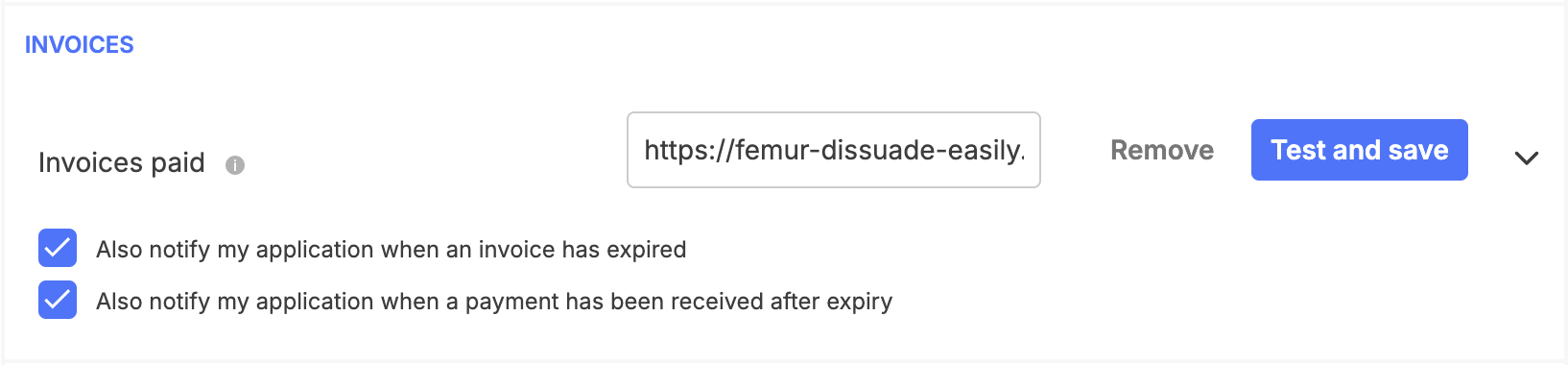
ngrok http 3000Copy the forwarding URL (e.g. https://abc123.ngrok.io) and set it as your webhook URL in the Xendit Dashboard → Settings → Webhooks → Invoice. Set the callback token to match your XENDIT_WEBHOOK_TOKEN env variable.
8.1 Register a User
POST /api/v1/auth/register
Content-Type: application/json

{
  "email": "[email protected]",
  "username": "johndoe",
  "password": "password123"
}
Response:
{
  "id": "cm123abc",
  "email": "[email protected]",
  "username": "johndoe",
  "name": null,
  "role": "USER",
  "createdAt": "2026-06-14T00:00:00.000Z"
}
8.2 Login
POST /api/v1/auth/login
Content-Type: application/json

{
  "username": "johndoe",
  "password": "password123"
}
Response:
{
  "accessToken": "eyJhbGciOiJIUzI1NiIsInR5cCI6IkpXVCJ9...",
  "tokenType": "Bearer",
  "expiresIn": 900,
  "user": {
    "id": "cm123abc",
    "email": "[email protected]",
    "username": "johndoe",
    "name": null,
    "role": "USER"
  }
}
Copy the accessToken — you'll need it for all subsequent requests.
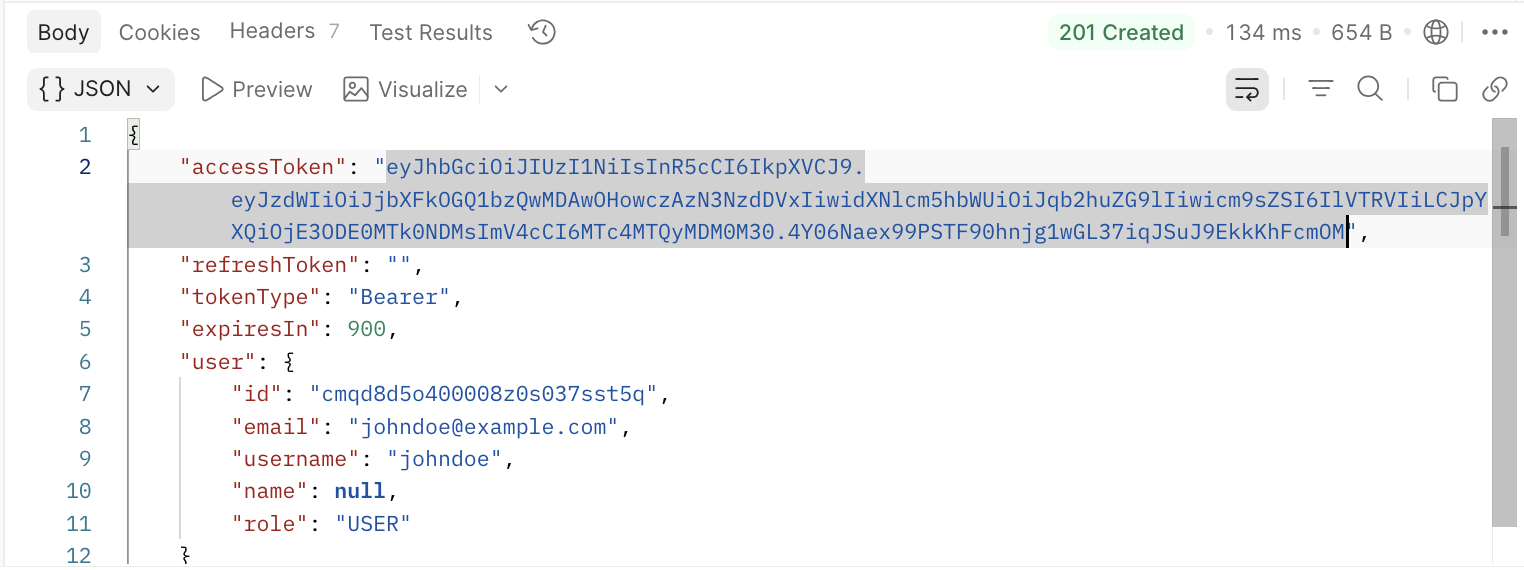
8.3 Check Initial Wallet Balance
Before creating a top-up, let's check the current wallet balance. Since the wallet was created automatically during registration, the balance should be 0.00.
GET /api/v1/wallets/me
Authorization: Bearer <accessToken>
Response:
{
  "id": "cm789ghi",
  "balance": "0.00",
  "currency": "IDR",
  "createdAt": "2026-06-14T00:00:00.000Z",
  "updatedAt": "2026-06-14T00:00:00.000Z"
}
8.4 Create a Wallet Top-Up
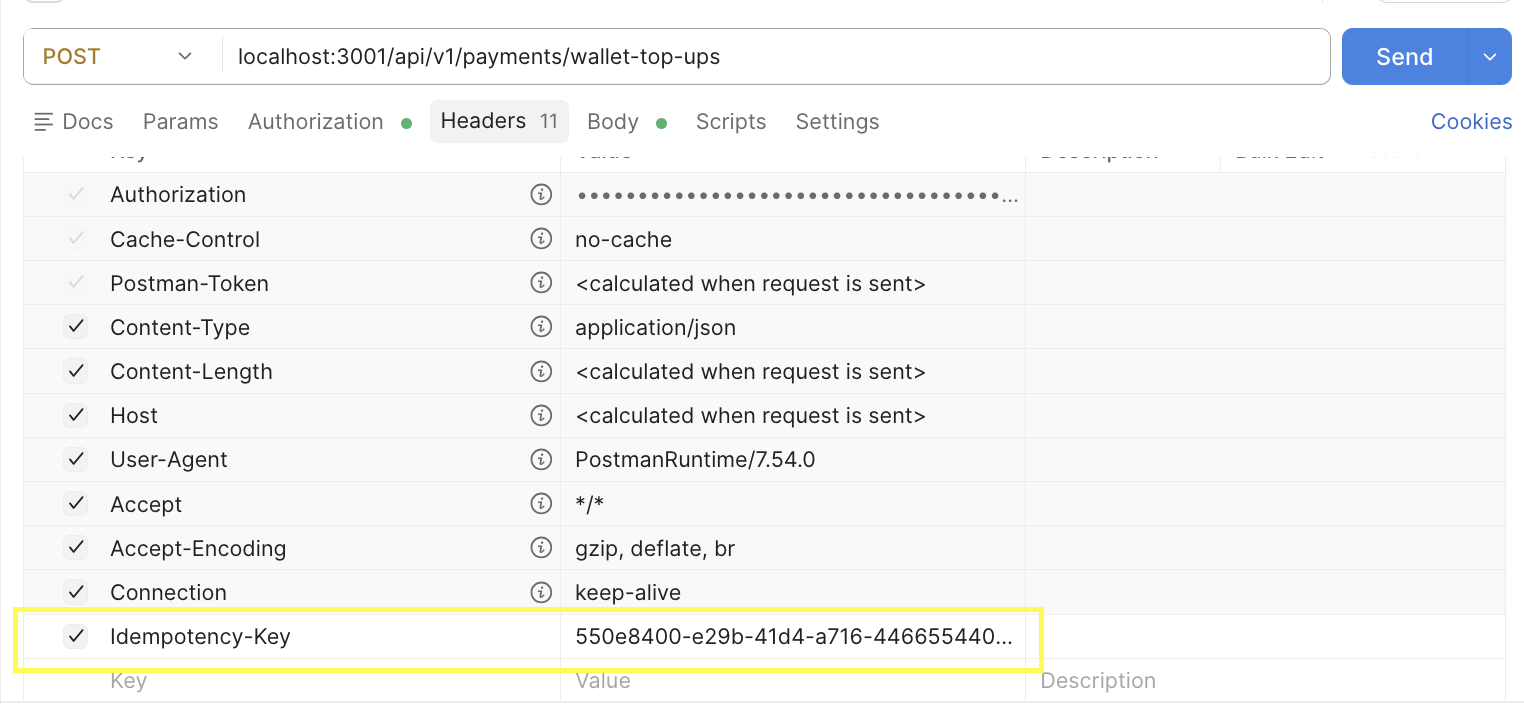
The Idempotency-Key header is generated on the client side — typically a UUID. In a real frontend application, this would be generated automatically using crypto.randomUUID() before the request is sent. For testing purposes, you can generate one manually or use any UUID generator, then paste it into the Headers tab in Postman. For now, you can just use this value:
550e8400-e29b-41d4-a716-446655440000
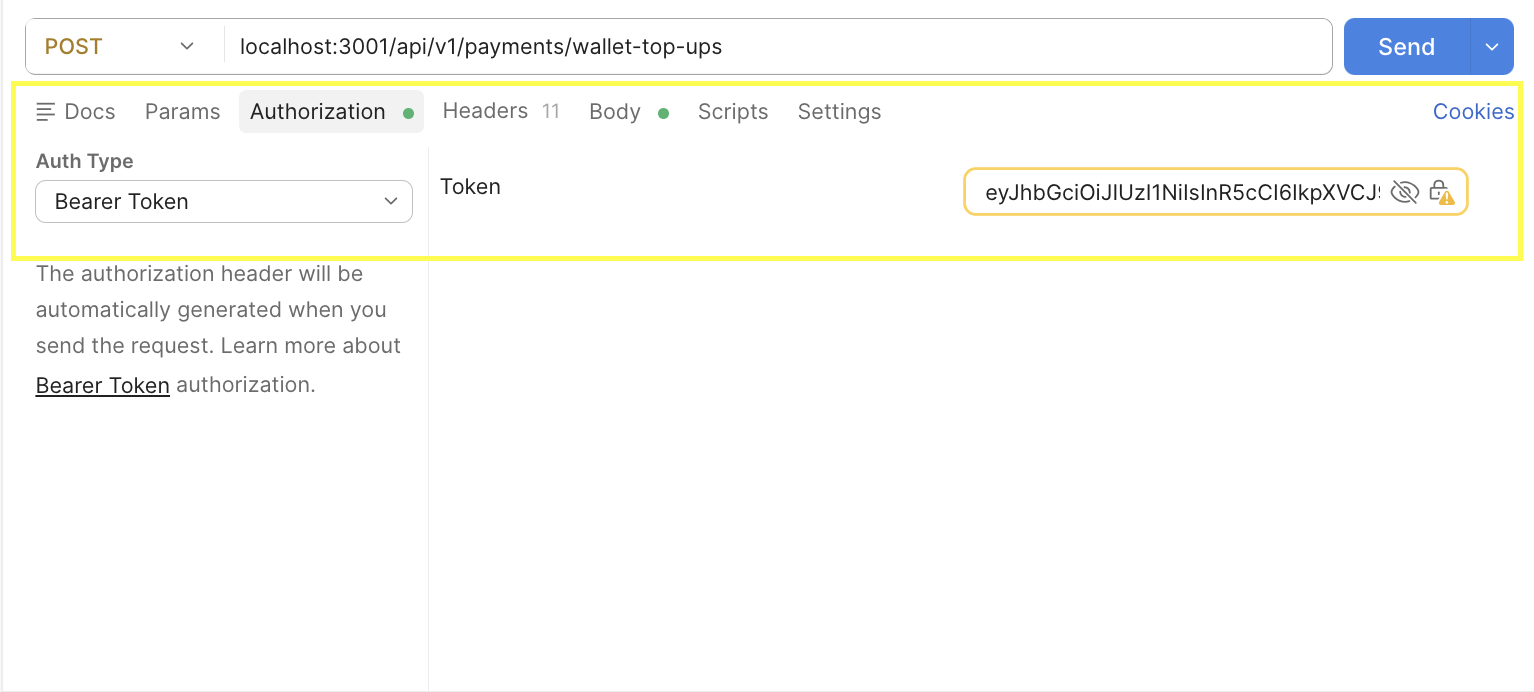
Then set the Authorization header with the access token from the login response:
Now send the request:
POST /api/v1/payments/wallet-top-ups
Authorization: Bearer <accessToken>
Content-Type: application/json
Idempotency-Key: 550e8400-e29b-41d4-a716-446655440000

{
  "amount": 50000
}
Response:
{
  "id": "cm456def",
  "reference": "WTU-20260614-A3F9C2B1D4E7F8A2",
  "status": "PENDING",
  "amount": "50000",
  "currency": "IDR",
  "invoiceUrl": "https://checkout.xendit.co/v2/..."
}
Notice the status is PENDING — this means the invoice has been created on Xendit's side, but the user has not paid yet.
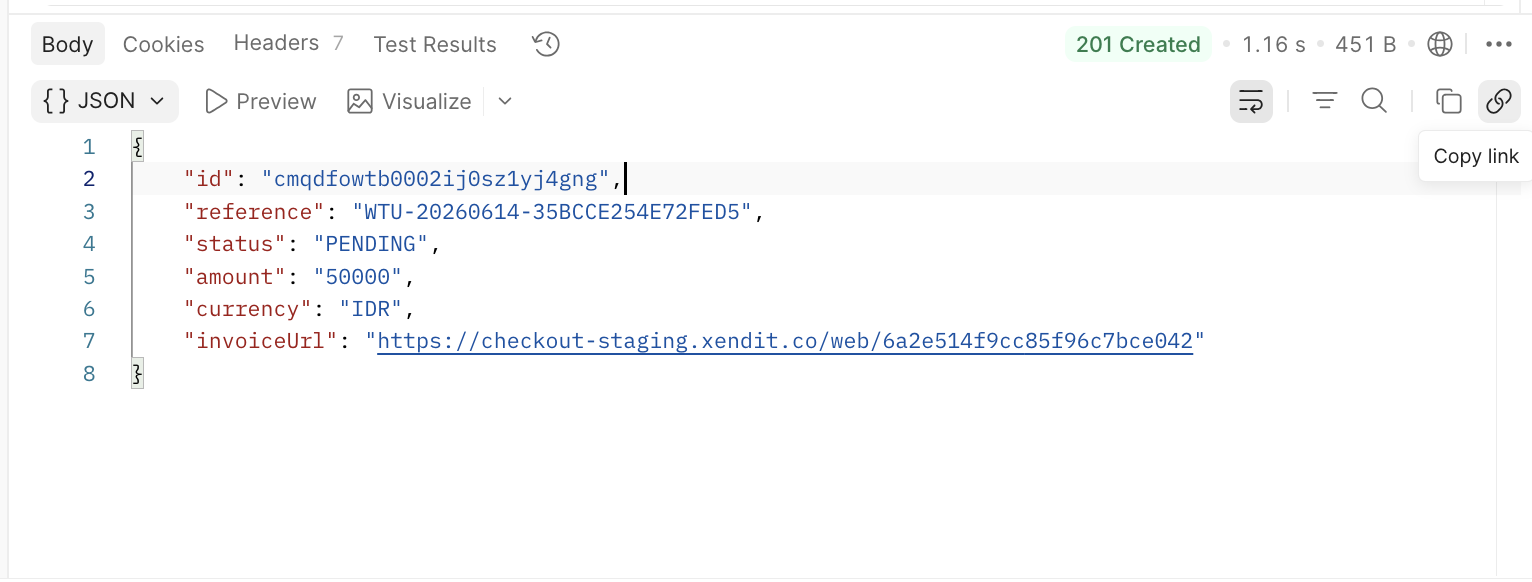
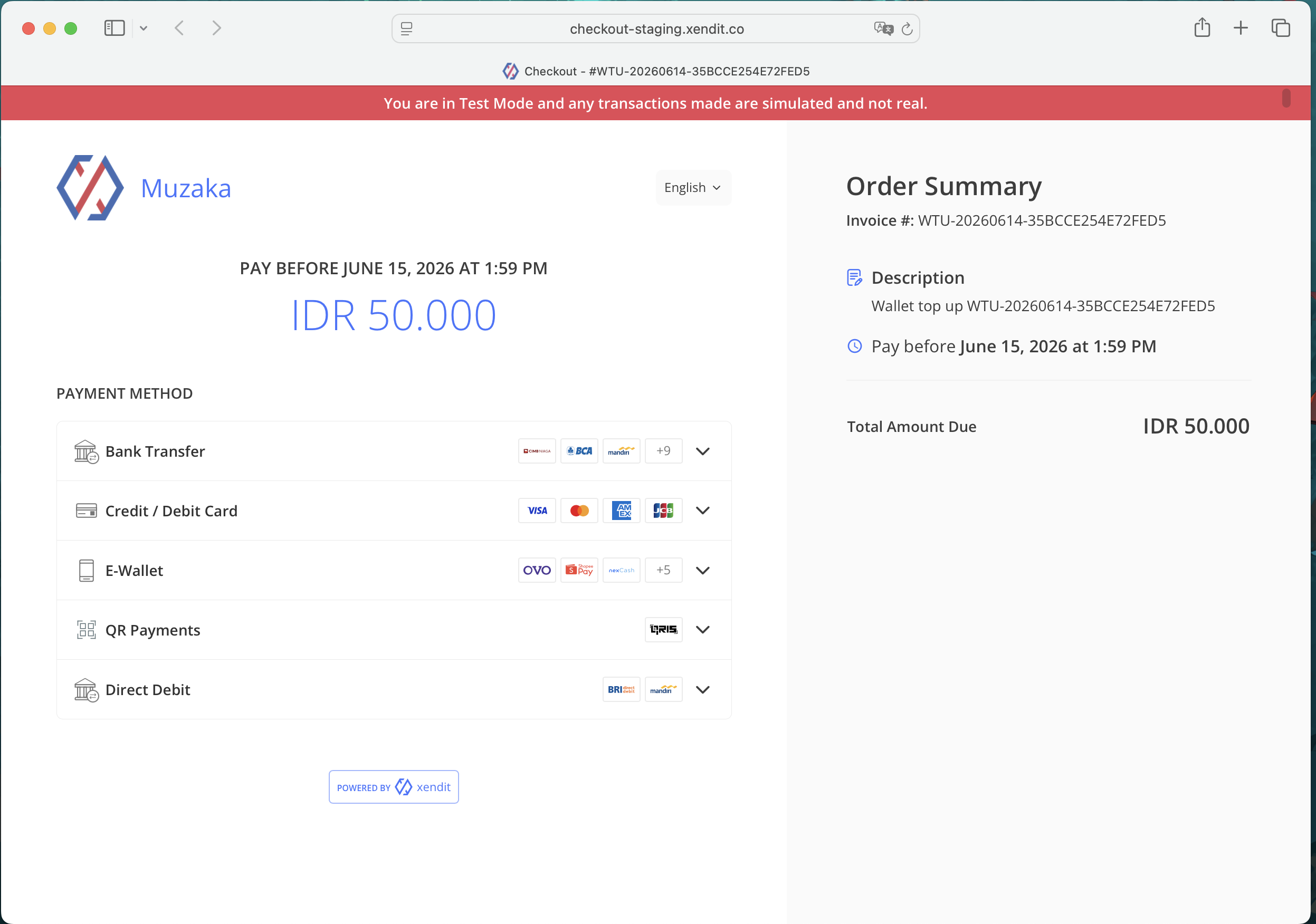
Open the invoiceUrl in your browser to see the Xendit checkout page:
8.5 Check Wallet Balance Before Payment
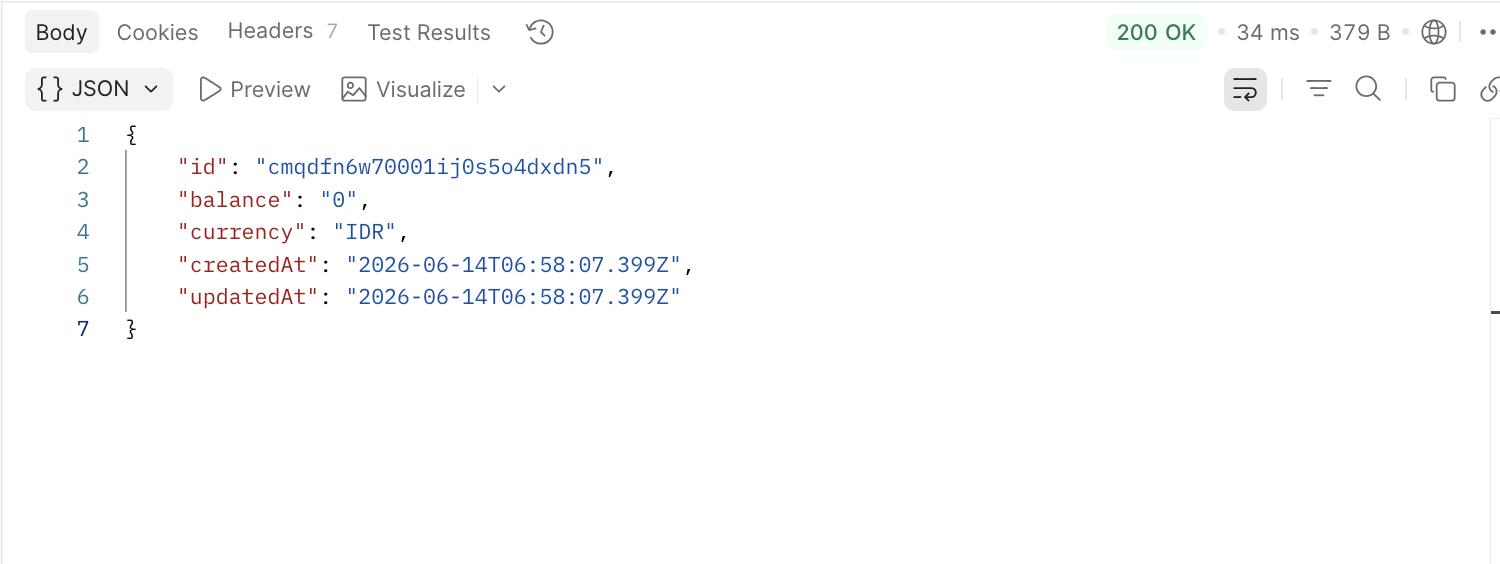
Let's check the wallet balance again. Even though we just created a top-up request, the balance should still be 0.00 — because the wallet is only credited after Xendit confirms the payment via webhook, not when the invoice is created.
GET /api/v1/wallets/me
Authorization: Bearer <accessToken>
Response:
{
  "id": "cm789ghi",
  "balance": "0.00",
  "currency": "IDR",
  "createdAt": "2026-06-14T00:00:00.000Z",
  "updatedAt": "2026-06-14T00:00:00.000Z"
}
This is the expected behavior. The balance does not change until the payment is actually confirmed. This is important — it means we never credit a wallet speculatively. We only credit it when we have proof of payment from Xendit.
8.6 Simulate Payment
Open the invoiceUrl from the previous response in your browser. You'll see the Xendit invoice page with available payment methods.
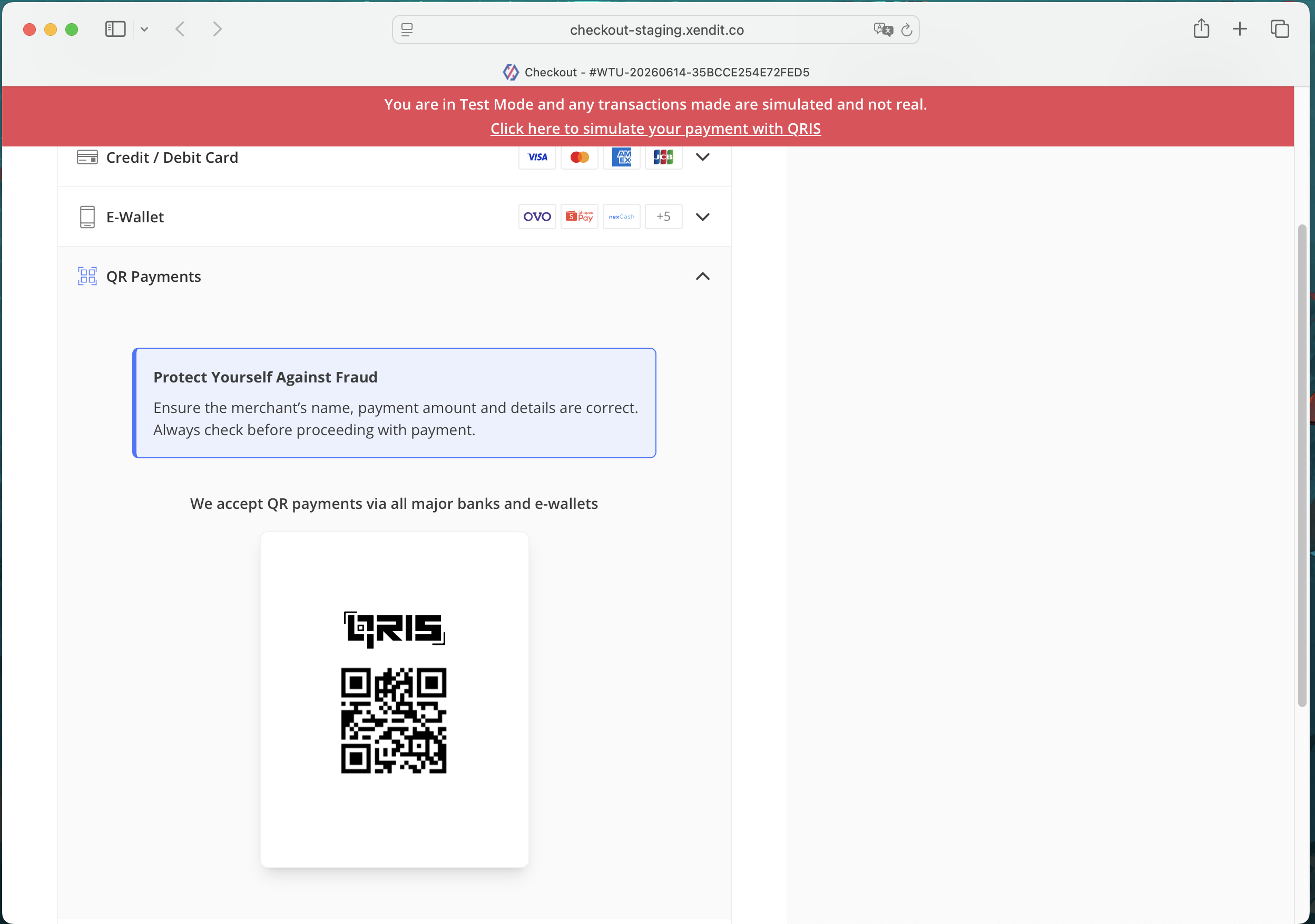
Select any payment method. Since we are using Xendit's test mode, you will see a "Click here to simulate payment" button instead of an actual payment form.
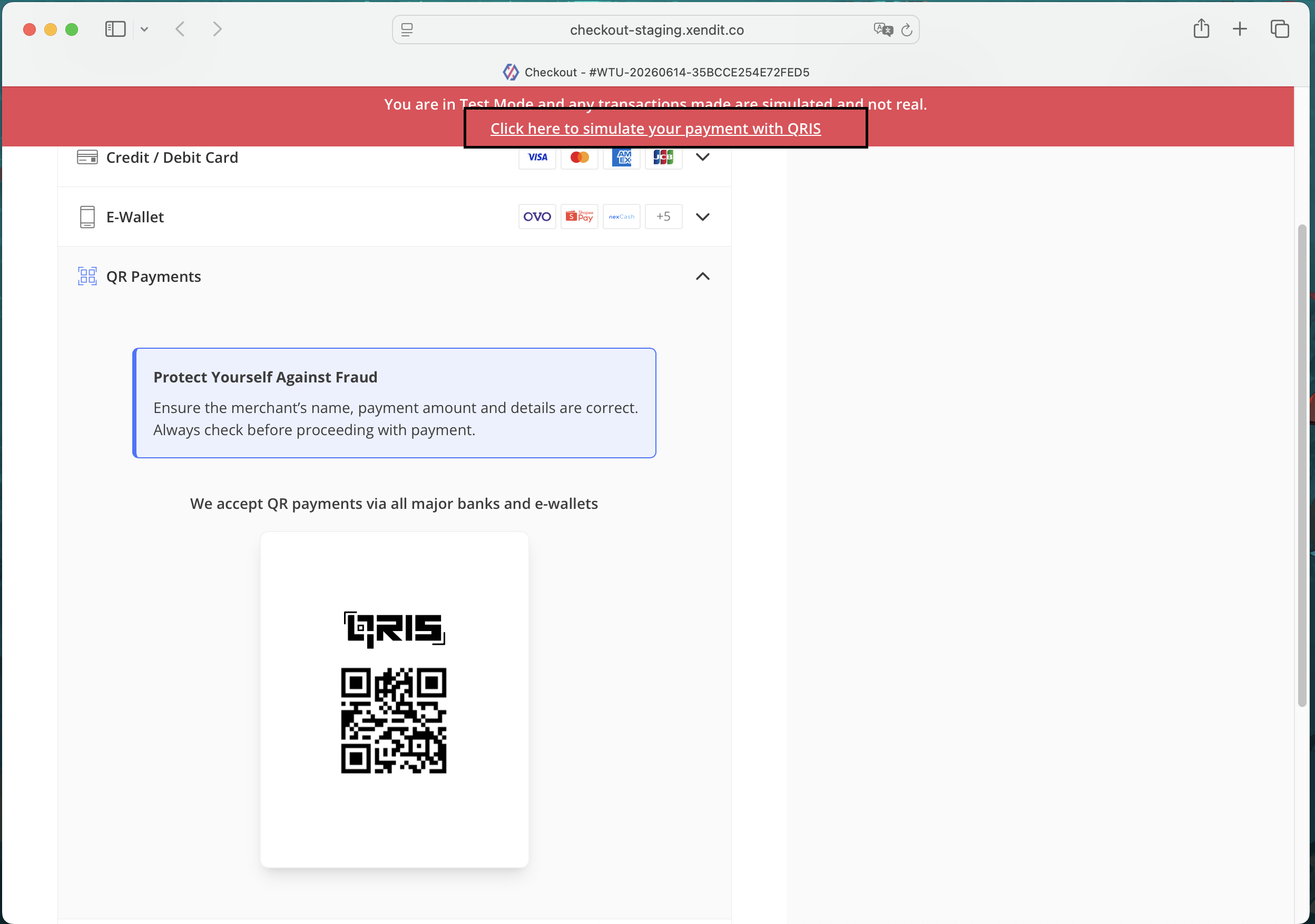
Click the button to simulate a successful payment. Once confirmed, the invoice page will show a success screen.
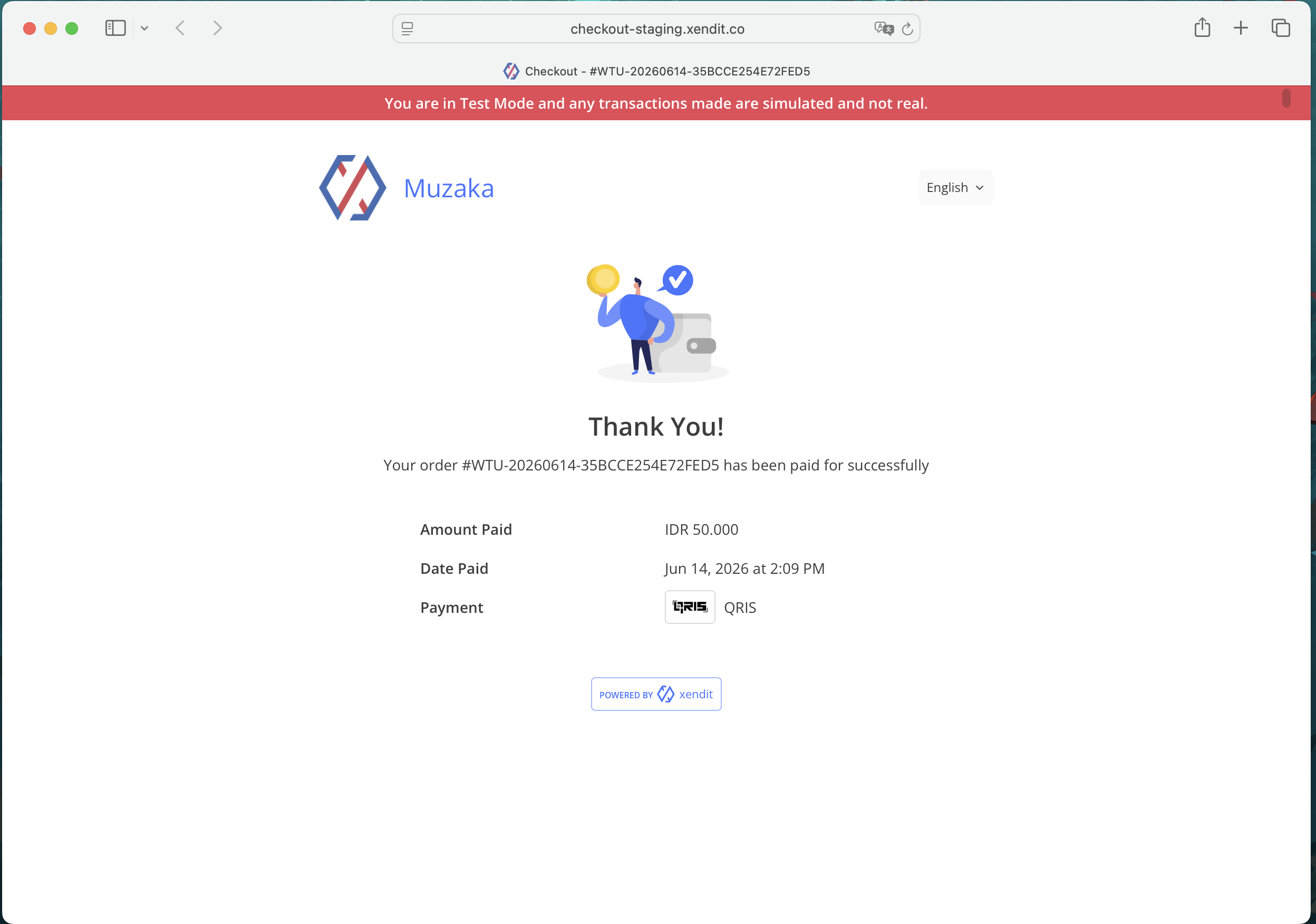
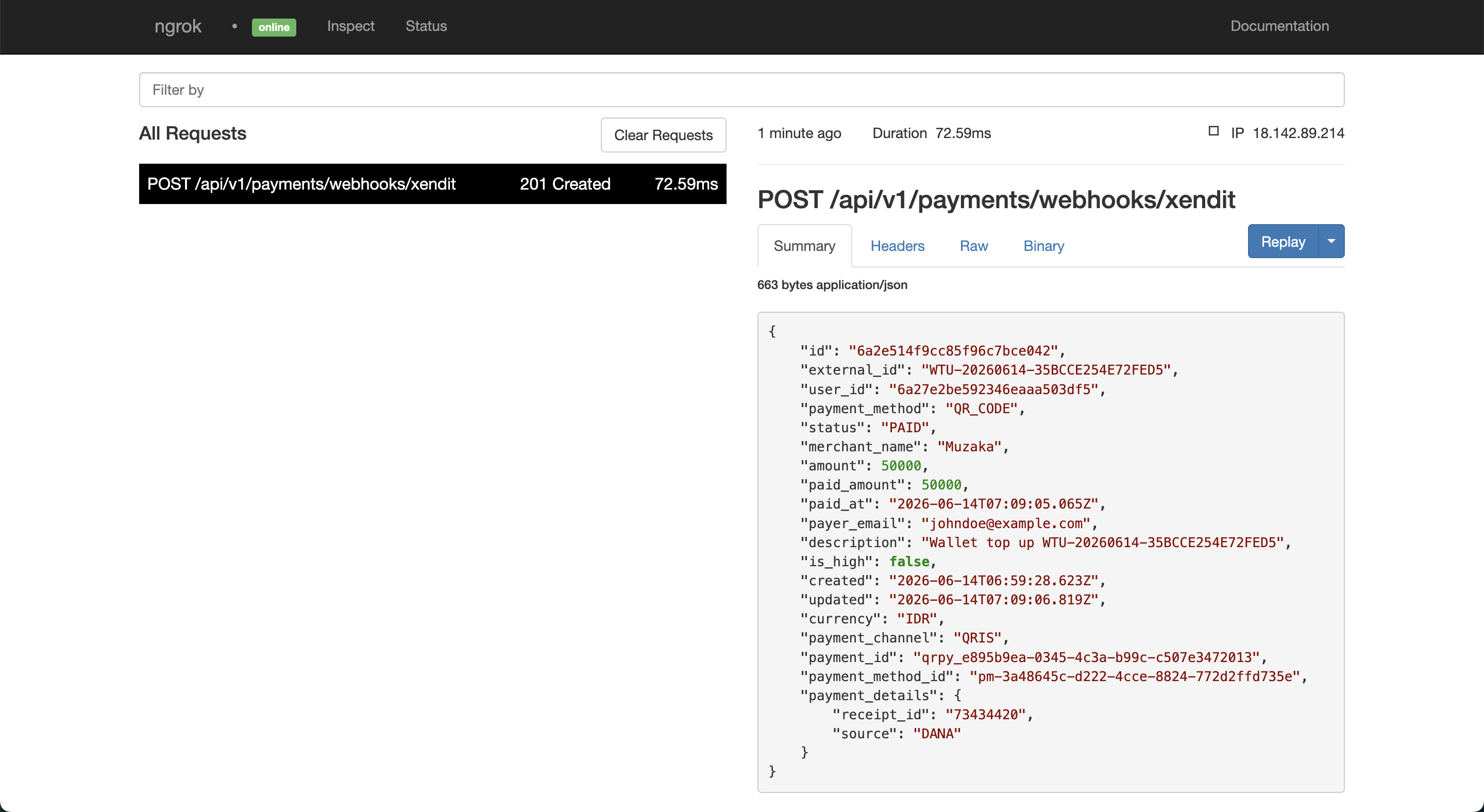
Once paid, Xendit will automatically send a webhook to your ngrok URL.
You can confirm the webhook was received and processed in two ways:
1. ngrok Web Interface
Open http://localhost:4040 in your browser. You should see an incoming POST /api/v1/payments/webhooks/xendit request with a 200 response status.
2. Xendit Dashboard
Go to Xendit Dashboard → Developers → Webhook Logs. You should see the webhook event listed there with the invoice status and the response from your server.
8.7 Check Wallet Balance After Payment
Now let's check the wallet balance one more time:
GET /api/v1/wallets/me
Authorization: Bearer <accessToken>
Response:
{
  "id": "cm789ghi",
  "balance": "50000.00",
  "currency": "IDR",
  "createdAt": "2026-06-14T00:00:00.000Z",
  "updatedAt": "2026-06-14T00:00:00.000Z"
}
The balance is now 50000.00 — confirming that the wallet was credited automatically after Xendit sent the webhook callback.
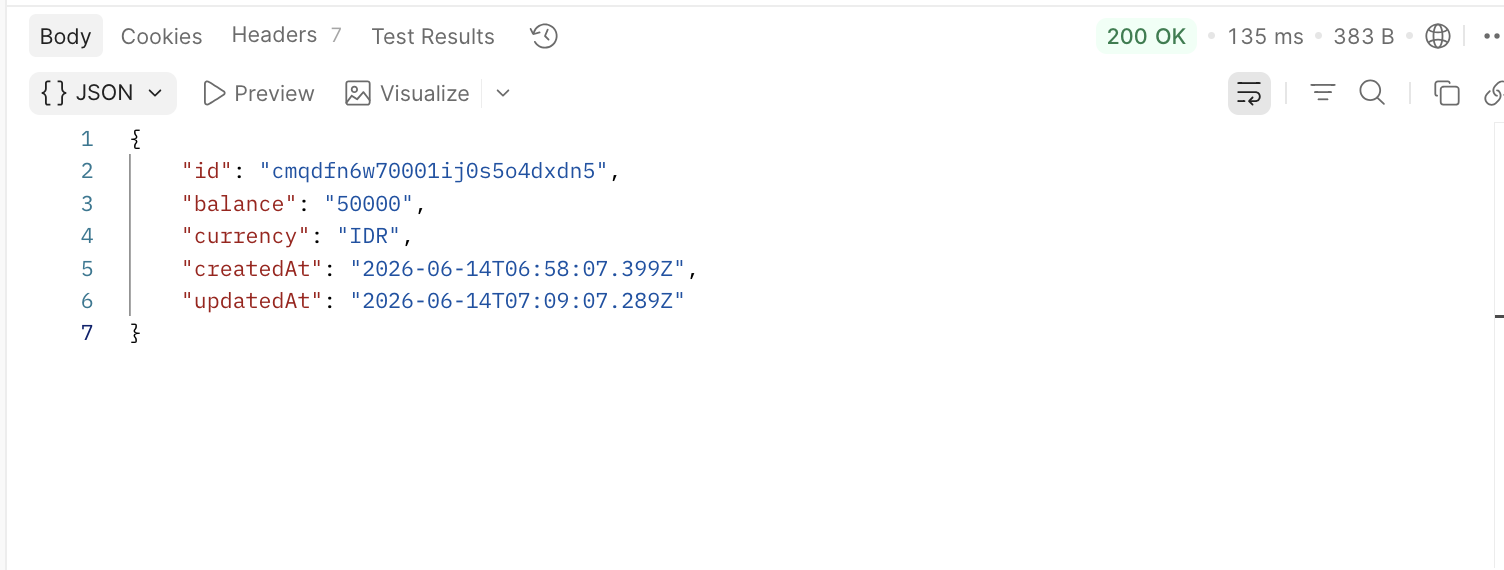
This is the complete payment flow:
Register → Login → Check Balance (0.00)
→ Create Top-Up (PENDING, balance still 0.00)
→ Pay via Xendit Invoice
→ Xendit sends webhook → wallet credited automatically
→ Check Balance (50000.00) ✓
9. Conclusion
In this tutorial, we built a complete wallet top-up flow using NestJS and Xendit. Here's a quick recap of what we covered:
Project Setup — installing dependencies, configuring environment variables, and setting up Prisma
Database Schema — designing models for
User,Wallet,WalletTopUp, andWalletTransactionwith proper decimal handling for monetary valuesAuthentication — a minimal JWT-based auth with a guard that protects the top-up endpoint
Xendit Service — a thin wrapper around the Xendit REST API using native
fetch, with Basic Auth header construction and callback token verificationCreate Wallet Top-Up — creating a
PENDINGrecord in the database before calling Xendit, so we always have a record regardless of what happens nextIdempotency Key — preventing duplicate invoices from network retries using a composite unique constraint at the database level
Webhook Handler — verifying the callback token, parsing the payload, crediting the wallet inside a database transaction, and guarding against double credit with
updateMany+ status check
The pattern used here — create DB record first, then call external API — is worth carrying into any integration with third-party payment providers. It gives you a recovery point if the external call fails, and makes it easier to audit what happened to every payment request.
The full source code for this tutorial is available at: https://github.com/mhmdnurf/nestjs-payment-gateway